 GAMESLASH
AnyGameRenderer turns rough game-play recordings into styled videos—not finished playable game art
By GameSlash
A research case study for AI game makers: compare blocky gameplay with stylized video previews, benchmark results and hardware limits.
A blocky game prototype is playable, but its characters still look like colored shapes. Researchers at Alaya Lab have published AnyGameRenderer, an experimental model that takes a short recording of that prototype and produces a more detailed video in a requested visual style. Its output is a video demonstration—not a finished playable 3D level, game engine renderer, or a pack of editable character assets.
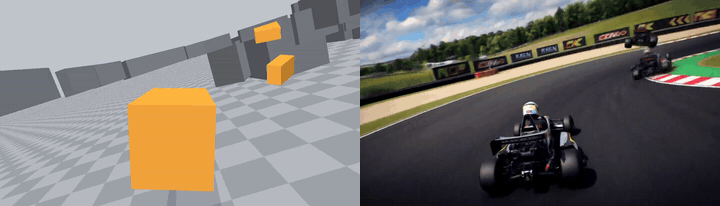
What creators can see in the examples
The project's gallery includes kart racing, shooters, arena games and other genres. Instead of asking a video model to invent the whole scene, the research takes an existing gameplay recording as a guide to where characters appear and how they move. The goal is to change how a scene looks while keeping its on-screen events aligned with the original footage.
The approach is useful for pitching a visual direction for a simple playable game built with coding agents. First make a level that actually works, record it, then compare a few visual styles. It does not remove the need to create actual game art, collisions, playable animation systems or engine integration.
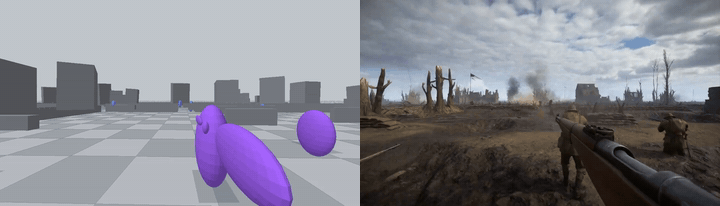
Evidence and an important limit
The researchers' paper first posted October 22, 2026 describes training on roughly 10,000 paired video clips, including footage from 38 agent-built games. In an evaluation with 59 held-out cases and 753 objects, temporal entity matching improved from 50.9% in the underlying model to 62.9% in AnyGameRenderer. These are benchmark results reported by the authors, not an independent test of all games.
The official setup guide is for advanced users: it calls for a GPU with at least 80 GB memory, at least 128 GB system RAM and roughly 125 GB of model files. The README estimates about 17 minutes to render a roughly five-second clip on an H100-class GPU. This is not real-time graphics and not a consumer-friendly one-click game maker.
Where a beginner should start
If you want to try the underlying idea without expensive hardware, focus on the workflow: build a tiny playable scene, capture ten seconds of its actual behavior, then write a short reference brief describing the look of the characters and world. Compare any styled preview against the original video for missing objects or incorrect timing before investing in final art. Treat that as an editorial workflow idea, not a claim that this research model runs on an ordinary laptop.
The repository lists Apache-2.0 for its source code, while the MiniMax-H3-based model weights use the MiniMax-H3 Community License documented on Hugging Face. Check the model terms and rights in your input footage separately. The images here show the researchers’ examples, not a GameSlash model run.