 GAMESLASH
Claude Blender: inspect a 3D prop from more than one camera angle
By GameSlash
Claude Blender lets an AI assistant inspect and edit a real 3D scene from several angles, rather than delivering one pretty render. See the project's own examples.
You ask AI to build a 3D prop for your game. The first render looks fine, but when you rotate it, a leg floats in midair or one mesh passes through another. A picture from a single camera angle is not enough to show whether the 3D object really works. Claude Blender is an open-source connection that lets an AI coding assistant work inside Blender and inspect the scene from several angles before you reuse it.
The interesting part is the AI checks the 3D work, not just generates a picture
Blender is a program for building and editing 3D objects. This project connects Claude Code to it, so prompts can add shapes, adjust surfaces, position a camera, take a screenshot and render an image of the actual scene. The developer says the agent sees its output, reviews what looks wrong and makes another edit. This is more useful for game props than accepting a single attractive but non-editable picture.
Unlike a typical text-to-image service, the result is a Blender scene with 3D objects you can keep working on. The integration supports exporting common 3D formats such as glTF/GLB and FBX. You still have to inspect topology, performance, scale, collisions and import settings before putting anything into a playable game.
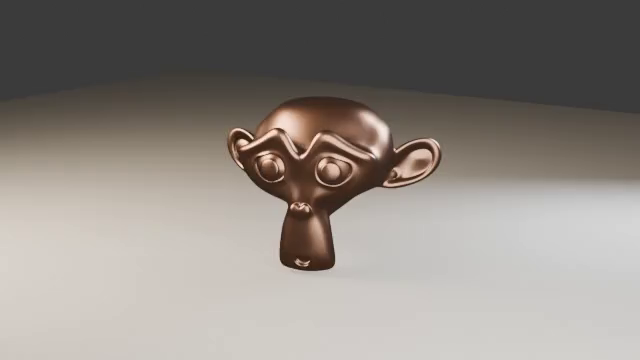
Camera-orbit example: one model from the front and back
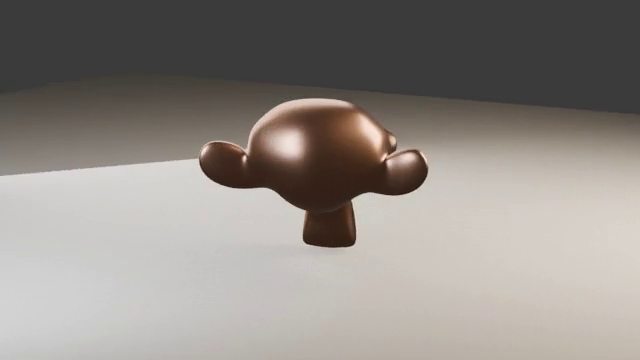
This example keeps copper Suzanne and its lighting fixed while a camera orbits the object. The video contains 36 frames at 24 frames per second. These two frames show opposite sides of that same model, illustrating how camera views reveal surfaces hidden from the front. They do not establish that Claude created the Suzanne mesh or that the result is game-ready.
Does it make whole game-ready characters automatically?
Not necessarily. The project offers local text-to-3D and image-to-3D integrations alongside programmatic scene creation, but the supplied examples include basic props and material experiments rather than a finished game. Each extra generator has dependencies and hardware requirements. No benchmark in the referenced materials proves that prompts consistently deliver rigged, optimized game characters.
How should someone vibe coding a game try it?
Start with one low-poly prop, for instance a wooden chest or street lamp. Ask Claude to create it in Blender, show front/side/three-quarter views, fix proportions and export a GLB. Only then import it into your game engine, check its scale and collisions, and test how it looks in actual gameplay. This separates the model-building step from game development and makes visual mistakes easier to catch early.
The repository requires Blender 4 or later, the Blender add-on, a local connection server and Claude Code with project setup. So it is not a browser tool that works with a single prompt; installation is still a technical step that AI may help you perform.
See the developer's Turntable walkthrough for the scene and camera setup. This article reviews documentation and video checked on October 27, 2026, rather than announcing a new release. GameSlash has not independently installed the add-on or imported the model into a game engine.