 GAMESLASH
AI pixel art gets blurry when edited? Pixel Art Studio makes Claude draw the actual pixels
By GameSlash
Pixel Art Studio asks Claude to draw game graphics pixel by pixel with reusable code, instead of generating a fresh picture on every edit. See character sheets and limitations.
AI can generate a pixel-style character in seconds, but when you zoom in the edges may be smudged, colors don't fit a small palette and the next pose changes the character's face. What if the assistant placed the actual pixels instead of asking an image model for another guess?
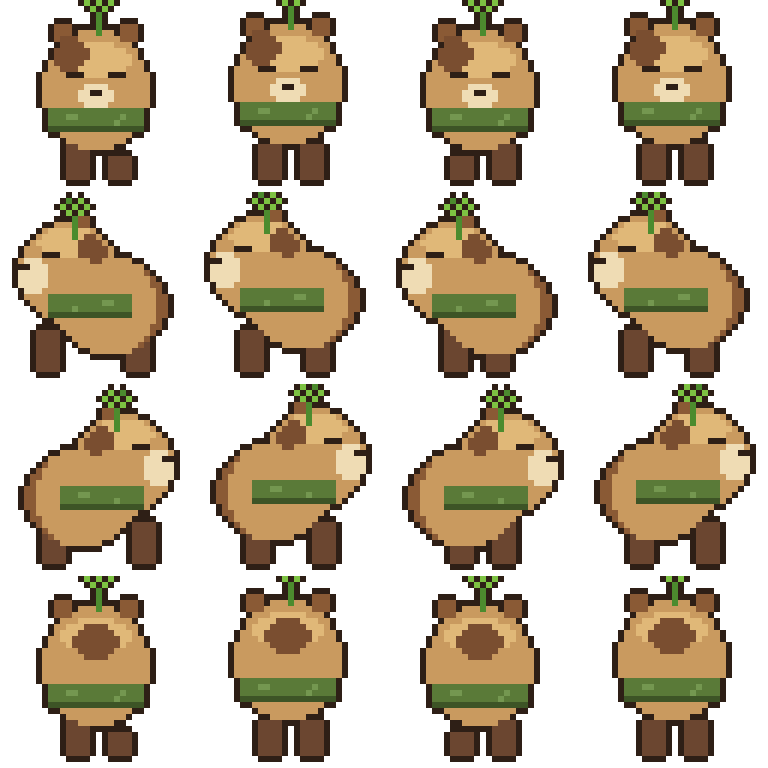
Pixel Art Studio is an open-source skill for Claude Code. It does not use an image-generation model to paint the final art and does not require Aseprite. Instead, Claude writes small Python scripts using Pillow, a graphics library, to put color into exact pixel positions. The script renders an image the assistant can inspect and revise.
Why write the pixels as code instead of regenerating a PNG?
Every colored square is controlled by the script, so you can request a smaller hat, a new palette or a cleaner outline and rerun the same drawing process. The developer describes a “see → critique → fix” loop: Claude renders an image, evaluates it against a checklist, edits the script and renders again. That is a proposed workflow, not a guarantee that every character will look great.
The capybara sheet above shows the idea clearly. It groups multiple frames and directions of one character into a consistent layout useful for animation in a game. The developer says the demonstration also used a reference image; it should not be presented as a result created without any inputs beyond a single sentence.
Another example: four frames of one character
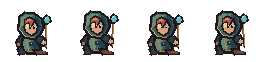
This sprite strip contains four frames of one small character. For a game, the frames can be played one after another to suggest movement. The important feature is the editable pixel layout; you still need to import frames and set animation speed in your game-making tool.
Can it help with existing messy AI art?
The project also documents a separate tool named pixelpipe. It can process an existing PNG to infer a pixel grid, clean stray pixels, reduce noisy colors and preserve or recover transparency. That is different from having Claude draw a brand-new character directly from code, and results depend on how messy the input is.
Is this really usable without knowing how to draw or code?
You can describe what you want in everyday language, but setup still requires Claude Code, Python and the project's files or skill. The instructions are in the official GitHub README. It is not a website that makes a complete game with one click, and you may still need to correct anatomy, colors and timing.
Use it when you want consistent, repeatedly editable pixel characters, icons or animation frames. Start with one tiny character and a simple four-frame idle animation. Check every pose before building a whole art set. See the developer's demo and source repository. This overview is based on the project's own examples rather than an independent GameSlash installation.