 GAMESLASH
Sprite Normals creates 2D normal maps through the web or an AI agent
By GameSlash
Generate normal maps for sprites and animation, or call create_normal_map through Sprite Fusion's MCP integration and save the returned PNG in your game project.
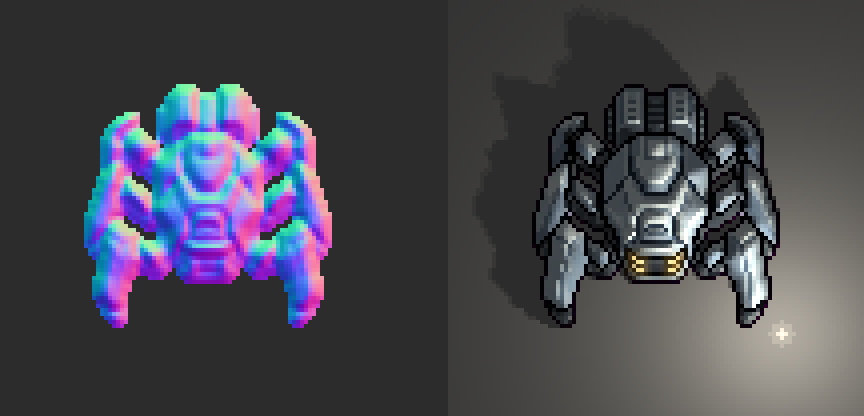
Sprite Fusion's Sprite Normals generates normal maps from sprites so a game engine can calculate directional lighting on 2D artwork. AI-assisted game developers can use it after generating or editing a character image. The current MCP documentation also includes create_normal_map for agents to call directly.
Why can lighting still make 2D art look flat?
An ordinary sprite provides pixel colors but not a detailed direction for every point on its apparent surface. A normal map supplies that directional information as a separate texture, helping the engine shade the sprite under dynamic lights. It does not turn 2D graphics into real 3D geometry.
The creator's spider demonstration pairs a blue-and-purple normal map with the lit character. The image shown here is a still frame from that official demo.
Works with sprites, sprite sheets and animation
The project's README says it estimates surface relief using sprite silhouettes and painted shading while preserving native pixel dimensions and transparency. Its CLI supports PNG sprites, GIF and APNG animations, and uniformly divided sprite sheets, which makes the workflow useful for characters with several movement or attack frames.

How to use it in an AI-assisted game workflow
Open the Sprite Normals web tool, provide your sprite, adjust the surface-depth settings, and export the normal map. Import that data texture into a compatible 2D lighting setup in an engine such as Godot or Unity. You still need to configure your lights and materials yourself; this is not an automatic scene-lighting service.
For an agent workflow, the Sprite Fusion MCP documentation lists create_normal_map for a sprite or animation. It is free with a connected Sprite Fusion account and returns the normal map as a PNG image. The call saves no files; the agent must save the returned image into the project. Normal-map generation itself uses image processing rather than an AI image-generation model.
Limits and source code
Because surface relief is inferred from the original illustration, painted highlights may sometimes appear as geometry in the result. Tune the parameters, inspect lighting in your own scene, and import normal PNGs as data rather than ordinary color textures.
The Sprite Fusion Sprite Normals repository is MIT-licensed and provides CLI and WebAssembly options. It serves a different purpose from Sprite Fusion's tilemap editor previously listed on GameSlash: this tool generates lighting data for existing 2D artwork.