 GAMESLASH
AI built the game, but where are safe-to-use sprites? Spritefetch helps find CC0 art
By GameSlash
A working game still needs characters, icons and animations. See how Spritefetch helps AI coding assistants find existing CC0 graphics with source and license records.
You asked AI to code a game and it runs—but your character is still a colored square, the interface uses placeholders, and you do not know which free game images are safe to ship. That is a different problem from generating yet another picture: finding existing, reusable art with a traceable source.
Spritefetch is a searchable library built to let a person or an AI coding assistant look up ready-made game graphics. Instead of drawing every asset, an agent can retrieve an image URL and information about its source and stated license. The site's licensing documentation says its initial catalog accepts CC0 assets.
What changes when AI is building the game?
Suppose you tell an assistant to make an underwater platformer. It needs a swimming enemy, a pickup icon and tiles for the level. A usual coding agent can implement movement but may leave visual placeholders. Spritefetch provides machine-readable records of individual assets and a way to look them up from code or tools. That reduces the manual hunt for assets; it does not automatically make a coherent art style.
The project advertises an API and agent integration for looking up assets. Its public catalog snapshot dated October 23, 2026 contains 203 records; that is a snapshot count, not a claim about the current live total.
A character animation and a UI icon are two different jobs

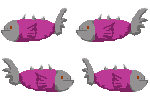
The fish sheet above contains several poses for a swimming animation; the dice here is a single small icon suitable for a button, item or status display after appropriate scaling. An AI assistant still needs to decide the sprite size, import settings, animation timing and whether different artists' graphics actually fit together.
Does CC0 mean it is safe to use in a commercial game?
CC0 is intended to allow reuse, including commercially, without a mandatory attribution requirement. Spritefetch records license claims and source links, which is useful for checking. However, a catalog's automated checks are not a legal guarantee: inspect the asset-specific source page and the original creator before shipping, especially for recognizable characters or third-party work.
Who should try it?
This is useful for people vibe-coding small prototypes who need legitimate starter art without having to create every sprite. Start with one game object, find an image, check its license and source, then ask your AI assistant to add it to the project. Replace or harmonize the art later. Do not mistake Spritefetch for an AI image-generation model—it is primarily a way to discover existing assets.
Start at Spritefetch and read its API guide and licensing policy. This is a source-based overview, not a GameSlash hands-on test.