 GAMESLASH
Wombo creates four character views, sprite animations and game audio
By GameSlash
A practical look at making character references, sprite animations and sound with Wombo, with a playable After Light example and key limits.
Want a character that can walk in your game, but do not know how to draw every animation frame? Wombo is an open-source AI-assisted studio whose creator demonstrates making multi-view character images, 2D animations, and sound effects, with a playable game example called After Light. This is a practical project walkthrough, not a newly launched product announcement.
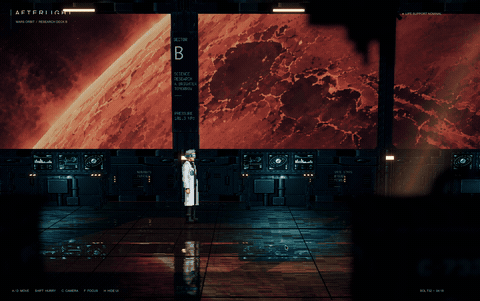
A real game example, not just a promise
The developer describes After Light as a 2.5D interplanetary cyberpunk work in progress. The game uses Unity and Blender, while Wombo was used to make some 2D graphics and sound. That distinction matters: Wombo does not automatically produce the finished playable game; the developer still has to assemble and program it in game-creation tools.
In the v0.2.6 devlog dated October 20, 2026, the developer describes adding the left-facing view to make four references: front, back, left and right, generated in one API request. This is a walkthrough of an existing project, not a launch announcement today.
One character, multiple angles and motion
Describe a character or provide a reference image, then generate four views through image services connected via OpenRouter. Use the references to create a short motion clip and select frames for an animation. Export PNG sprite sheets, which collect the animation frames into one image, and Aseprite files for further editing.
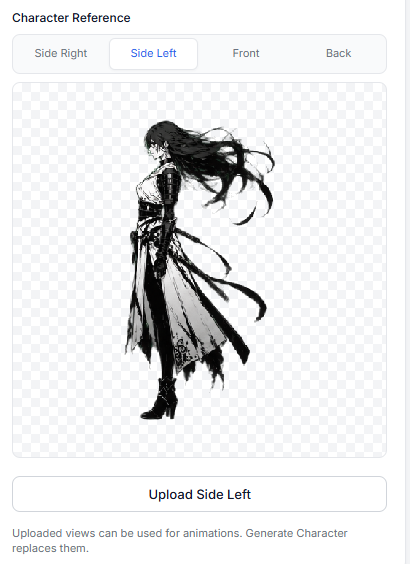
The author shows a separate animation workflow. You still need to review character consistency, each frame, and how the animation loops inside the engine; matched views are a design goal, not a guarantee of flawless output.
How a beginner could put it to work
Start with one playable character: prepare a reference image, generate its different views, export one short walking animation, and test the result in your existing game scene before making more assets. In a text-to-code workflow, ask your coding assistant to wire those exported sprites into a simple movement state rather than asking it to generate an entire game in one prompt.
For sound, Wombo connects to ElevenLabs and can save MP3/WAV assets. The project requires Node.js 20+, FFmpeg and API keys for the generation services, so it is not a free one-click tool. Its code is distributed under an MIT license, while external generation services have their own usage terms. See the official setup instructions, sprite and animation guide, and repository license before starting.