 GAMESLASH
spritehatch fixes AI-redrawn faces in falling animation frames
By GameSlash
A November 9 spritehatch commit keeps original rig artwork when AI redraw fails to preserve faces in falling poses, with refreshed character motion examples.
The open-source spritehatch project updated its sprite-animation workflow on November 9, 2026 to stop an AI redraw step from changing a character's face during falling and death frames. A follow-up update regenerated example motions for its knight, archer, rogue and barbarian, keeping the original face consistent between frames. The changes are documented in the project's public commits, rather than a numbered stable release.
What changed in the redraw step
The project's image-generation stage can repaint rough 2D rig poses with ComfyUI. Previously, when a character leaned during a fall, the face-protection logic could fail to detect the head and leave an AI-generated replacement face in the result. The November 9 fix preserves the rig-drawn source frame for those tilted falling poses, similar to how fully prone poses were already handled. The actual code change modifies redraw.py and its tests.
The creator then republished the sample knight and three other character motion previews with updated walk, attack, casting and death results. The linked example-image commit shows which official sprites and animations changed; it should not be mistaken for a public benchmark or a newly released generative model.
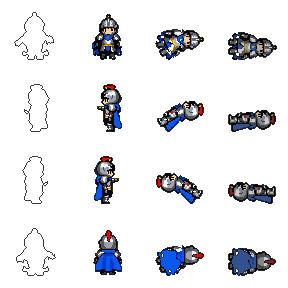
How game developers can use it
The tool generates multiple views of a character together from one prompt, then uses a 2D skeleton rig to produce idle, walk, attack, cast and death motions. Its `--redraw` option sends groups of rig-guided frames through an image-to-image model with OpenPose controls, and color reduction maps the output back to the standing sprite's palette. For fixed facial features, preserving the original rig art on difficult poses is a useful alternative to repeatedly asking a model to redraw the entire head.
To reproduce the workflow, follow the README and setup guide, run local ComfyUI with the required models, create a character using `spritehatch`, and run `spritehatch-animate out/knight --motions walk,attack,death --redraw`. The output contains direction-specific sprite sheets, GIF previews and an anim.json file carrying frame sizes and timings.
Availability and limitations
The code is MIT licensed, but operating it locally requires Python, ComfyUI and model weights. The README says the default Z-Image route uses about 22 GB of model files, and describes an M1 Pro test system, so this is not a lightweight browser-only editor. The images are developer examples and were not independently generated or play-tested by GameSlash. The author commits include an AI co-author line, but that line alone should not be read as independent proof of the quality of the results.
Sources: spritehatch repository, November 9 face preservation fix and updated motion examples.